| Overview of the PM Central Hierarchy |
|---|
The My Summary tab can be found at each level of the PM Central hierarchy and provides a summary of the tasks, overdue tasks, active issues and active risks that are assigned to the logged-in user.
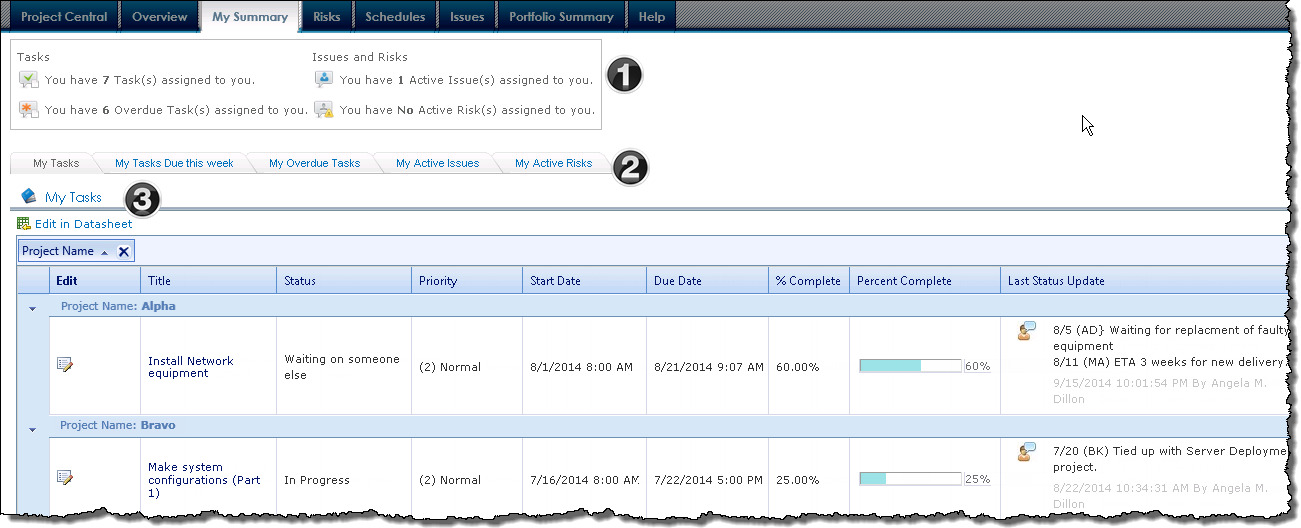
When working with the My Summary pages keep in mind:
- When the My Summary pages are accessed from the portfolio or department sites, tasks will appear grouped by the Project Name
- The content displayed is determined by where you are in the PM Central hierarchy when you access the My Summary pages:
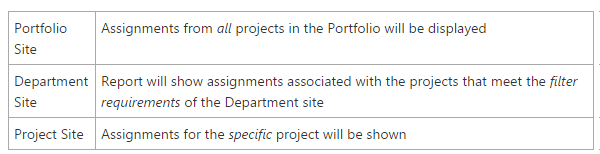
| Name / Web Part | Description | |
|---|---|---|
| 1. | My Status
PM Central Custom Web Part |
This custom Web Part located at the top of the page displays the number of tasks, overdue tasks, active issues and active risks that are assigned to the logged-in user.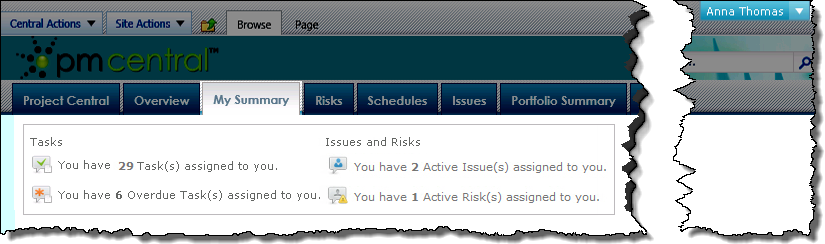 |
| 2. | SharePoint Navigators |
Each of the tabs will take the user to a different display page. Users can see:
|
| 3. | Bamboo Data-Viewer Web Part |
Each page accessed from the My Summary navigators will have a Data-Viewer web part configured to reference a specific list rollup schema.
|