Issues:
You created a rollup that gets all the Tasks in your site collection. You did not configure a filter for the rollup. There is a list called Important Tasks in the top level site that has tasks in it, but none from that list are shown in the rollup.
Resolution:
To troubleshoot and resolve this issue, follow these steps:
| Step | Action |
|---|---|
| 1. |
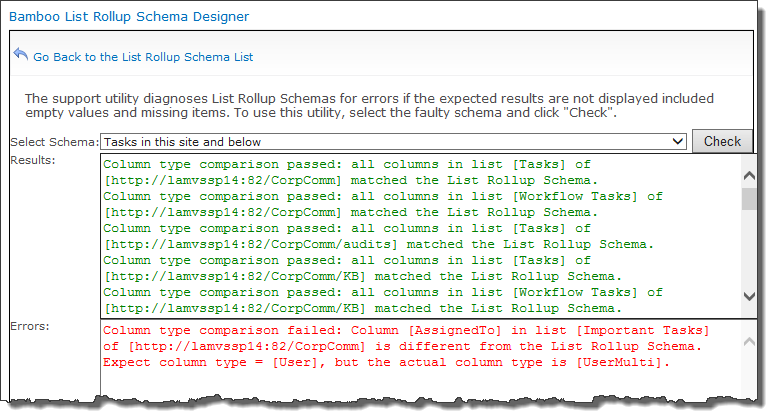
Check the List Rollup Schema Design Support Page.
It reports that the Column type comparison failed for the Assigned To column in the list called Important Tasks. Further, it reports |
| 2. | 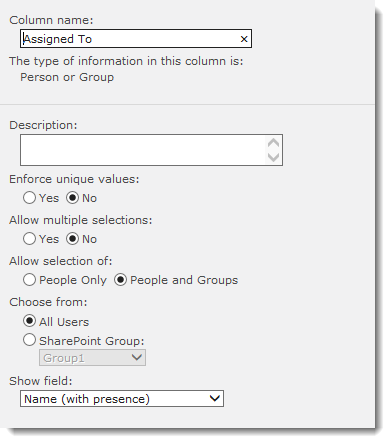 Check the configuration of the Assigned To column in the master list of the rollup. Verify that Allow multiple selections is set to No. Check the configuration of the Assigned To column in the master list of the rollup. Verify that Allow multiple selections is set to No. |
| 3. | 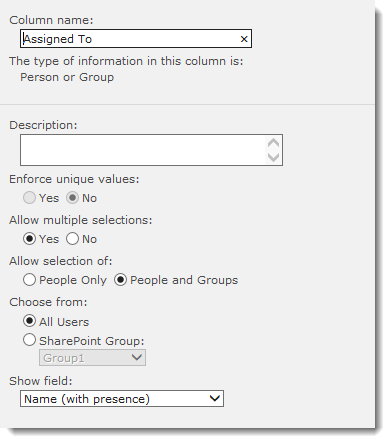 Check the configuration of the Assigned To column in the Important Tasks list. See that Allow multiple selections is set to Yes. Check the configuration of the Assigned To column in the Important Tasks list. See that Allow multiple selections is set to Yes. |
| 4. | To resolve, change the configuration of the Assigned To column in the Important Tasks list to match the configuration in the master list for the rollup. |