Chart Options settings determine how users can interact with the chart in the Chart Plus Web Part.
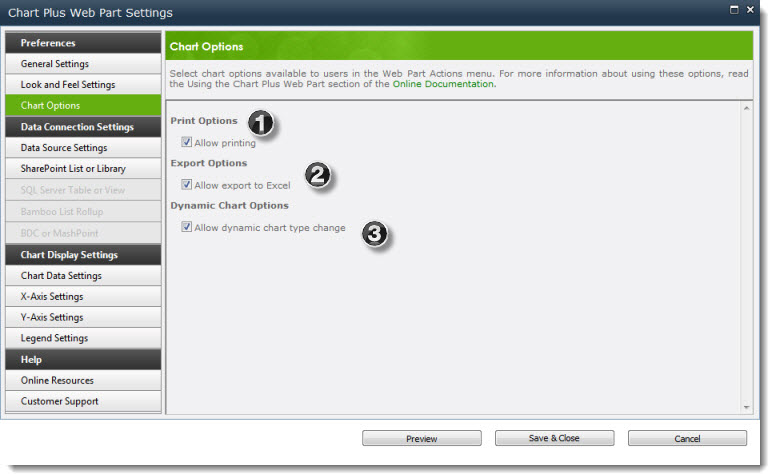
There are three chart options available:
| 1. | Print Options | Allow printing: Allows users to format the chart for printing. Adds the Print Preview option to the Action menu on the Web Part toolbar. |
| 2. | Export Options | Allow export to Excel: Provides an option for users to export the chart as an image to Excel. Adds the Export to Excel option to the Action menu on the Web Part toolbar. Note: Underlying chart data is not exported. |
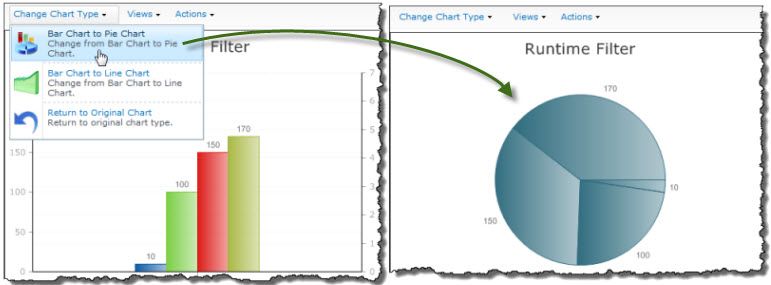
| 3. | Dynamic Chart Options | Allow dynamic chart type change: Allows users to switch from a Pie or Line Chart to a Bar Chart (and back again) or from a Bar Chart to a Pie or Line Chart (and back again) using the Change Chart Type menu in the Web Part toolbar. |
See also: